

SecureTower Features

SecureTower is not just a standard application, but a comprehensive multi-component system which can be easily integrated into a corporate network. It helps address multiple issues of sensitive and personal data protection:

Traffic monitoring

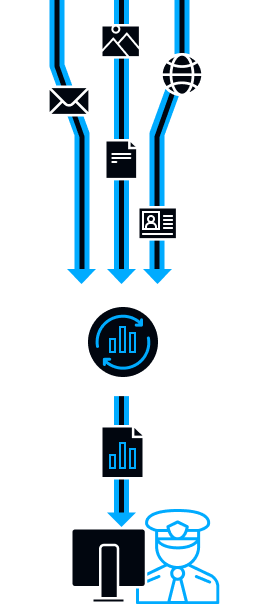
SecureTower controls incoming and outgoing e-mail messages (including encrypted), files and archives attachments, communications in Skype, ICQ, QIP, Windows Live Messenger, Miranda, Google Talk, etc. Contents of blogs and social networks posts are also closely monitored.

The program analyzes network traffic transferred through HTTP, HTTPS, FTP, POP3, SMTP, IMAP, YIM, OSCAR, MSN, XMPP (Jabber) protocols along with encrypted SSL for POP3, SMTP and messengers. The list of supported protocols is constantly updated.

Microsoft Exchange Server mail control

Complete inspection of all inbound and outbound correspondence through corporate mail server based on Microsoft Exchange Server 2007/2010. Any incoming and outgoing messages, as well as internal employees’ correspondence are controlled to comply with the predetermined security policies.

Files, archives and password protected documents control

SecureTower is not only good at tracing the fact of password protected document or archive transfer but also in sending instant notification about it to the predetermined e-mail address to inform the security officer. For user convenience such files are marked in a particular way to distinguish them from the rest intercepted data in the program interface. In some cases the program allows viewing the archives’ contents. Moreover, the system can detect password protected Microsoft Word, Microsoft Excel, PDF and other documents. This feature provides tracing of protected file transfer and recognizing the document type.

Documents print control

SecureTower system controls all types of documents sent to local and network printers. Printer control module has become the first stage in the implementation of full external device control functionality.

The system analyses all printed documents for compliance with security policies. Moreover SecureTower system accurately identifies the user who sent a document to print and the printer used.

SecureTower saves all intercepted documents into a database and displays all contents in the User Console in PDF format. It’s possible to display documents as text with original formatting. SecureTower allows economizing on storage space for intercepted files on the hard drive by minimizing the quality of the image. The intercepted file can also be exported into PDF, printed directly from the SecureTower User Console or from an external application.

Scalability

Scaling feature enables to avoid system overloading and losing part of traffic by monitoring networks with complicated topology and multiple workstations. You just add new server components for data interception or data processing if needed.

System centralized installation, customizing and management

The simplicity of installation, centralized system deployment and management from a single console make the process of SecureTower integration into the company’s existing infrastructure simple and fast.

User identification

As opposed to the commonly used system based on the domain name identification, SecureTower additionally takes advantage of such information as user contact details and accounts, IP-address and the period it was used. SecureTower allows automated linking of all communication programs’ accounts (messengers, Skype, e-mail) and IP-addresses, used every day by employees to user cards stored in the System. User cards, in their turn, are integrated with the Active Directory and are filled with all available information there. It helps to avoid misinterpretation of intercepted data, associated with the sender of sensitive information.

Moreover, it simplifies SecureTower implementation in large companies as manual linking of each user details to large amount of users takes much time.

Traffic interception filtering

Only necessary information from determined workstations is intercepted thanks to the feature of traffic filtering. The program provides massive opportunities for interception filtering; the traffic can be filtered by: individual IP-addresses or a range of addresses, network ports, MAC-addresses, account logins, protocols, file or e-mail size, etc.

Security rules creation

SecureTower minimizes working hours spent on the security breach incident investigation and significantly improves the security department’s efficiency through decrease of false positives’ amount. It is achieved by flexible customizing of tools for simple and compound security rules creation.

The program provides content, attributive and statistical information analysis. Content analysis includes key-word and regular expressions search, as well as the technology of digital fingerprints of documents and databases.

Digital fingerprints

The Digital fingerprints function to trace and control data allows SecureTower accurately identify sensitive documents in the outbound data flow.

An optional sensitive documents’ collection is created to be controlled by the system. All transferred documents are analysed and compared with the collection. In case of a partial or complete match to the existing document, SecureTower sends immediate notification to the specified e-mail.

Protection of personal data in databases

SecureTower possesses a unique feature to secure information contained in databases. It serves to control the libraries that contain private information, valuable contact data, subscribers’ bases and other business information without taking intermediate actions.

For example, you can trace only a combination of a name, job position and e-mail address. At that, the alert system will respond only to the combination and ignore mentioning of a name only, thus helping to minimize the percentage of false positives.

To save time and resources only the newest information is indexed when a database is updated.

Regular expressions’ search

Regular expressions’ search helps to control the template or typical data transfer. For example, for banking or financial sphere that may be: credit card and bank account numbers, standard ID and social insurance numbers.

Entitlement management

SecureTower provides flexible access control, so the system functionality access can be tuned according to any type of organization hierarchy. Access rights can be limited, if needed, e.g. right to search through intercepted data, or access network activity stats for predefined user lists, in addition, the option to deny Security Centre access or limit user rights to create, edit or delete security rules is available now. So, manager may be entitled to monitor subordinates’ activities, or security officer may be granted access to only those data that SecureTower defines as sensitive.

SecureTower allows two types of authorization: based on existing Windows Active Directory account or based on internal program authentication system.

Immediate notifications delivery

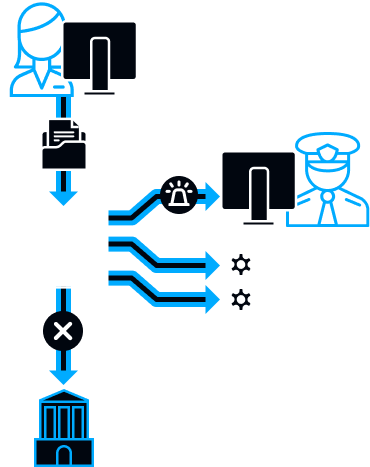
SecureTower notifies security department about all cases of unauthorized sensitive data transfer and sends automatic alert to the e-mail of a security officer.

Detailed reports

SecureTower provides detailed statistical reports on employees’ network activities, illustrated with graphics and schemes. Such reports allow viewing the way corporate resources are used by employees and estimating the personnel’s efficiency. SecureTower provides comprehensive information about the user, the time and the computer involved in a security breach incident.

Graph analyzer of employees’ connections

In addition to a complete employee’s work day snapshot, the new graph analyzer of employees’ connections is introduced. It helps to define employees’ social circle inside and outside the company. Apart from most active network users’ determining, the possibility to control personnel’s communications with competitors helps to evaluate employees’ loyalty. All these features allow using the system not only for investigation of the incidents happened but also for data leak prevention.

Regular screenshots

To allow an in-depth study of the activities occurring on user computers, SecureTower takes screenshots on all computers controlled by the system at pre-set intervals inconspicuously for the user, and saves them into a database chronologically. A quick gallery view of these screenshots gives full information about all employee’s activities.

Having a complete picture of the working day, a detailed report on Internet misuse for personal purposes, alongside with a series of screenshots taken on an employee's computer during the whole day, you will be able to fully control your staff and assess the efficiency of their work time. With SecureTower you always know what your employees are actually busy with.

Desktop activity

SecureTower provides a complete picture of each employee’s workday using the module of endpoint activity analysis, which displays the periods of computer’s activity and idle time since boot-up till shutdown in a vivid graphical form.

The system collects detailed statistics of all executed applications, and builds a chart to represent the percentage of application use by the employee. The statistics represent the exact time of the user’s work with each application.

Document original format recognition

The algorithm for file type recognition is implemented in SecureTower. Alongside with a simple file search based on its extension the program can recognize data type, irrespectively of the extension set by user. The function helps to define exact file format and control transferred files’ contents even if the file type was changed intentionally.